Missed calls shouldn't mean missed customers.
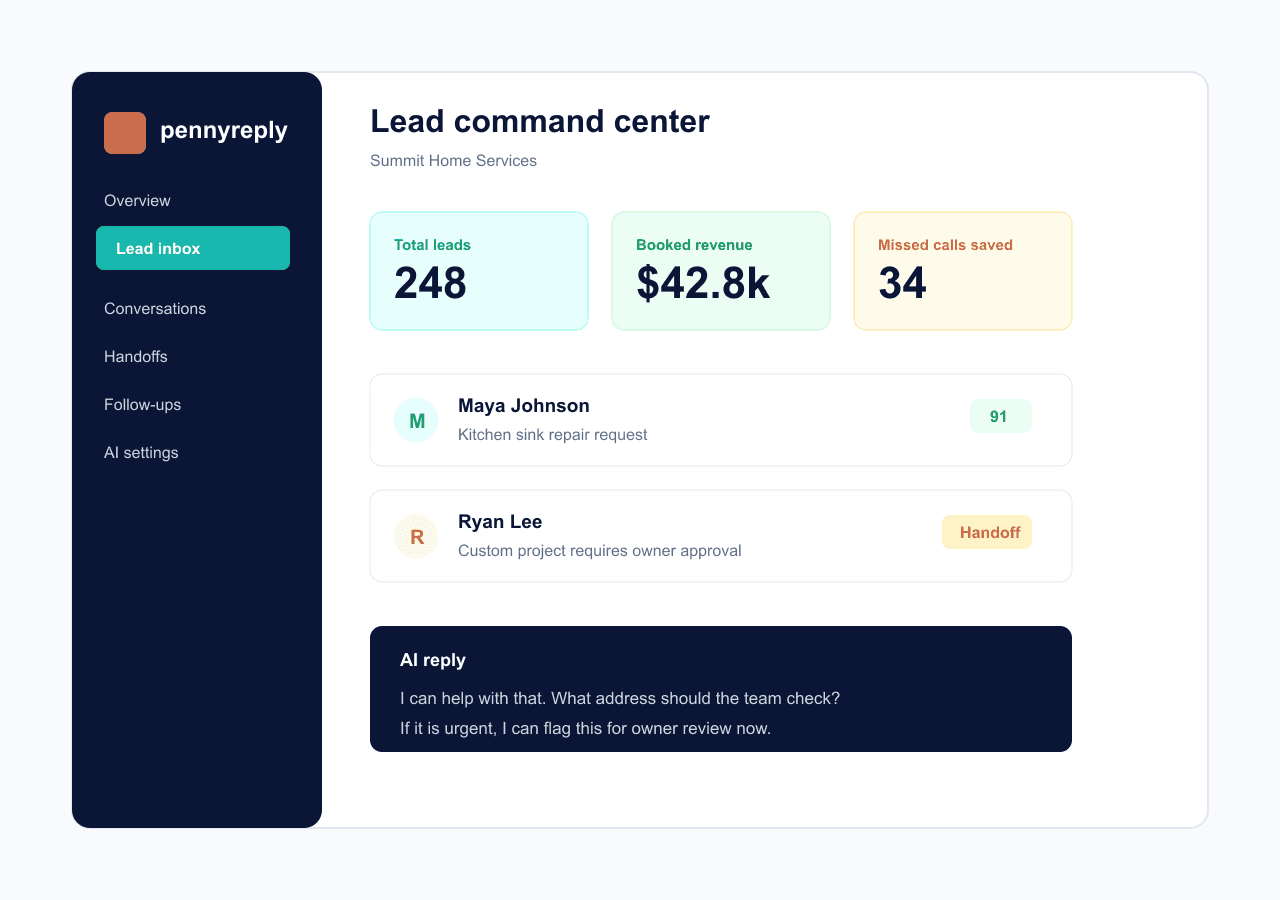
PennyReply helps businesses respond to missed calls, website visitors, and customer questions with Penny, an AI assistant built to capture leads, answer common questions, and help book appointments.
Setup imports from your website in minutes. You approve everything before the AI talks to a customer.
Meet Penny
Penny is the AI receptionist inside PennyReply.
Penny uses your business information, services, hours, pricing rules, FAQs, and booking settings to help customers get answers faster. You stay in control while Penny handles the repetitive follow-up.
Friendly enough for customers. Controlled enough for business.
Penny can respond from your website, missed calls, and customer messages. She helps collect the details your team needs, then hands off anything uncertain or risky.
Penny texts missed callers back instantly.
Penny answers common questions from approved info.
Penny captures names, phones, services, and timing.
Penny helps fewer customer messages slip away.
AI responses can make mistakes. PennyReply gives you tools to review, edit, and control how Penny responds.
Try it live
See how Penny handles a customer message.
This is the same widget your customers would use, answering for a sample service business. Ask about prices and hours, then ask for a custom quote and watch Penny collect the request for owner review instead of guessing.
Answers only from approved info
Prices and policies come from the business setup, never from AI guesses.
Knows when to stop
Custom quotes, complaints, and anything uncertain are sent to the owner for confirmation.
Remembers the conversation
It tracks the service, vehicle, and timing you mention, and only asks for what's still missing. Open the owner view below the chat to see what the business sees.
Penny for Precision Auto Spa
Live demo · sample business · no signup needed
Core value
Penny learns the business before she talks to customers.
Most chat tools ask owners to configure everything by hand. PennyReply starts by reading the business website, then asks the owner to confirm what Penny should use.
A setup process built for busy owners.
The owner reviews clean recommendations instead of starting from a blank settings page. Missing prices, FAQs, hours, booking rules, and review links are called out before launch.
Imports services, FAQs, hours, contact details, and booking rules from your website.
Normalizes messy customer messages before intent detection and reply generation.
Keeps original customer wording visible while using cleaner meaning internally.
Asks clarifying questions or creates a handoff when the AI should not guess.
How it works
A clear path from visitor message to booked opportunity.
The workflow keeps the AI useful without hiding the owner from decisions that need judgment.
Build the knowledge base
Paste your website. PennyReply drafts services, FAQs, hours, service areas, policies, and missing setup items for owner review.
Let Penny reply
Penny responds from approved information, extracts fields, scores the lead, and saves the full conversation record.
Escalate the risky work
Custom quotes, complaints, refunds, low confidence, and restricted services go to a human before a promise reaches the customer.
Key features
Everything Penny needs to keep leads moving.
The product combines customer-facing chat with the internal controls a business owner needs before trusting AI with real inquiries.
Penny replies instantly
Website visitors and missed callers can get a fast response based on your business settings.
Penny captures lead details
Name, phone, service, timing, urgency, and source are saved to a clean lead record.
Penny answers common questions
Hours, service areas, FAQs, and approved policies stay available even when the team is busy.
Penny helps book appointments
Booking requests can use your availability, rules, and owner approval settings.
Penny follows your rules
Tone, confidence threshold, banned words, required phrases, and handoff rules stay configurable.
Penny works 24/7
Penny can keep collecting customer info after hours while risky requests wait for review.
Built for real service teams
Flexible enough for different industries. Strict enough for customer-facing AI.
Each business controls its own services, prices, policies, tone, handoff rules, and booking limits. The AI does not need to be tied to one trade.
Pricing
Start with missed-call recovery. Add more automation when the business is ready.
Plans are built around the same foundation: approved business knowledge, AI guardrails, customer conversations, and owner handoffs.
Basic
$149/mo
$249 setup
Revenue recovery plan for small businesses that miss calls or website leads.
Website AI chat, Missed-call text back, Lead capture
Start with PennyGrowth
Popular$249/mo
$249 setup
For businesses that want booking, follow-up, review, and lead qualification automation.
Everything in Basic, Calendar booking, Automated follow-ups
Start with PennyPro
$399/mo
$249 setup
For businesses that rely heavily on calls, bookings, payments, and automation.
Everything in Growth, AI receptionist voice agent access, Deposit and payment collection
Start with PennyBasic includes missed-call text back so Penny can help recover leads automatically when you miss a call. Usage limits help keep pricing fair, and higher-volume businesses can upgrade anytime.
Common questions
The questions owners ask before turning on AI.
Short answers here, full details on the FAQ page.
Can the AI quote prices?
Only from approved services and pricing rules. Custom quotes, unclear details, or handoff-rule matches go to a human instead of being guessed.
Do I have to turn on automatic replies right away?
No. You can test in demo or manual mode first, with replies saved as drafts or routed to you for review.
How does setup work?
Paste your website URL. PennyReply drafts services, FAQs, hours, and booking rules, and you review and confirm everything before it goes live.
What happens with messy customer messages?
Typos, slang, and incomplete wording are normalized before intent detection, and the customer's original message stays visible in history.
Ready to test it?
Start with Penny from the business website.
Review the imported setup, test messy customer messages, and go live only when the rules are ready.